
A New Idea in E-commerce: Drag an Order Across the Counter and Your Online Store Updates Itself
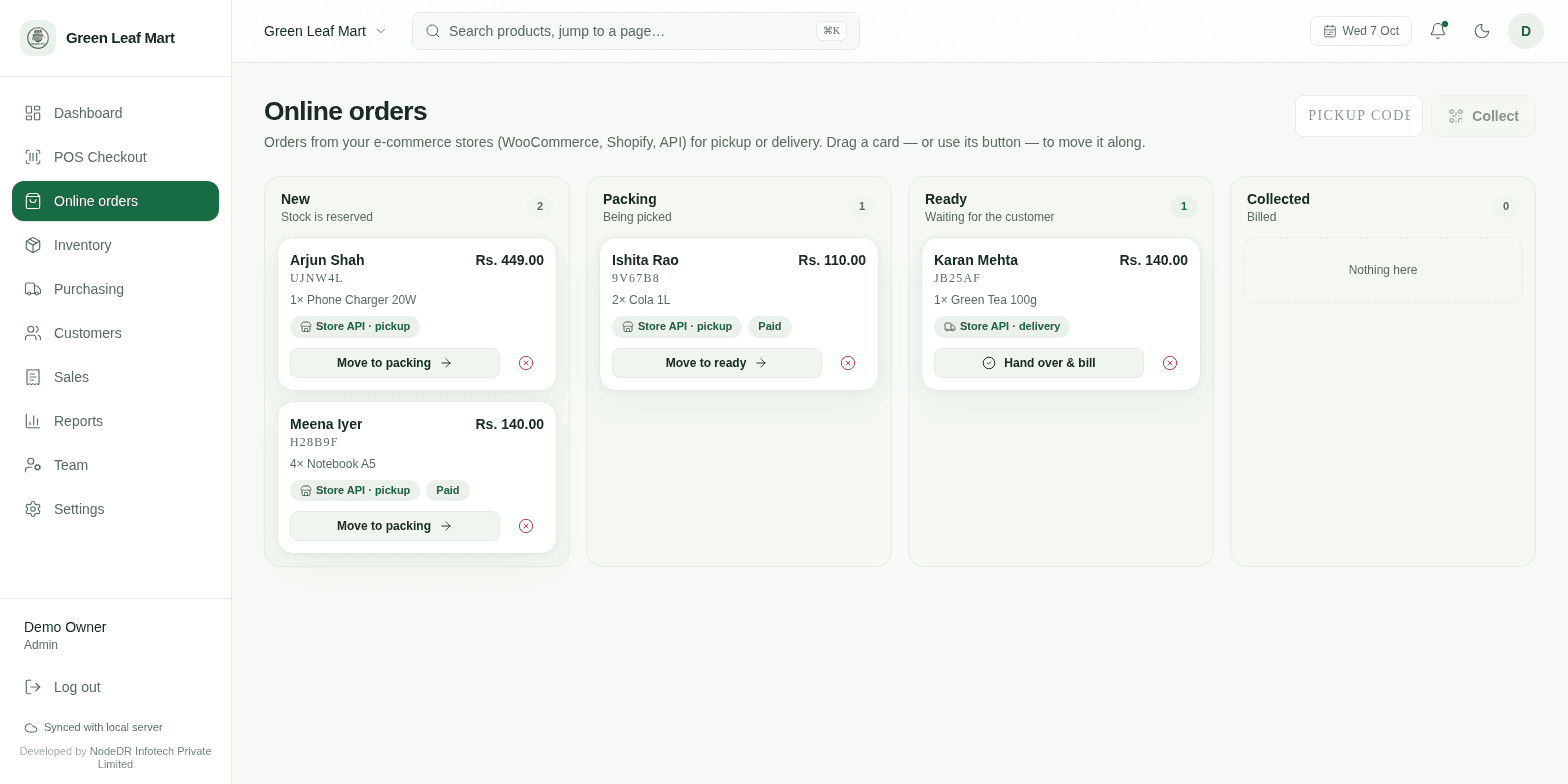
Most small shops that sell online run two systems that never talk. An order arrives in the website admin; someone reads it, walks to the shelf, packs it, and later types “shipped” back into the website so the customer stops asking. The shelf, the till and the website each hold their own idea of what is in stock and what has been done.
We think the counter should be the control surface. So in NodeDR POS an online order is just a card on a board — and moving the card is what tells your store.
Drag it, and it’s done
Orders from your store land in New, with stock already reserved so the website can’t sell the same unit twice. Whoever is packing drags the card to Packing, then Ready. When the customer arrives they give a 6-character pickup code, the cashier hits Hand over & bill, and the sale — GST, stock, invoice — is rung up in one go. No card, no retyping, no “did we already bill that?”.
Drag and drop isn’t decoration. The shop floor doesn’t read manuals; a board you can see and move is the whole training. (On a touch tablet the buttons on each card do the same thing.)
The part that’s new: the card talks back
Every move on the board is sent out immediately, three ways depending on how your store connects:
- A signed webhook to your own site —
order.updatedwith the new status, the previous one, and the pickup code. Retried automatically if your server is briefly down. - WooCommerce — the order flips to processing / completed / cancelled, and the customer gets a note with their pickup code the moment it’s Ready.
- Shopify — the order is tagged
nodedr-ready(or packing / collected), so you can hang your own emails and flows off it.
The dashboard’s “Online orders waiting” list refreshes on its own too, so the person at the till sees the same picture as the person packing.
One write API, built so a retry can’t hurt you
Your storefront creates an order with one call. Prices come from the POS catalog, never from the request, and the call is idempotent on your own order id — send it twice and you get the same order back.
POST /api/external/orders
Authorization: Bearer nk_live_...

{
  "externalId": "web-1001",
  "fulfilment": "PICKUP",
  "customer": { "name": "Ishita Rao", "phone": "9876500000" },
  "items": [{ "sku": "COLA-1", "quantity": 2 }],
  "paid": true
}

// 201 -> { "order": { "id": 41, "status": "NEW", "pickupCode": "K7M2QX" } }
And this is what arrives at your webhook when someone drags that card to Ready:
POST https://your-store.example/hooks/nodedr
X-Nodedr-Signature: sha256=3f1c...

{
  "event": "order.updated",
  "data": {
    "externalId": "web-1001",
    "status": "READY",
    "previousStatus": "PACKING",
    "pickupCode": "K7M2QX"
  }
}
Not able to take webhooks? Poll GET /api/external/orders?updatedSince=… — it returns only your own orders that changed.
Why we think this is the right shape
- Scoped keys. A key can be limited to creating orders, or to reading stock, or to taking bills. Order events go only to the key that owns the order — customer details are never broadcast.
- Reserve, then sell. An open order holds stock; the real stock movement and the invoice happen once, at hand-over. Cancelling needs no clean-up.
- Yours. It runs on your machine, under AGPL-3.0. No per-order fee, and the order data stays on your own hardware.
One honest note: the API-key path is covered by automated tests; the WooCommerce and Shopify status pushes are written against those platforms’ public APIs, so try them on a staging store before you point them at production.
Full request and response reference: External API & Webhooks. How the board works: Online Orders. Prefer to try it first? Get NodeDR POS from the Microsoft Store or see the code on GitHub.